Text Messages (SMS)
Last updated: September 9, 2026
on this page · 1. What this program is
1. What this program is
Zeffyr LLC ("Zeffyr," "we," "our," or "us") lets people host events and invite guests. When a host posts an update about their event (a time change, parking details, a reminder), Zeffyr can deliver that update by text message to guests who RSVP'd and chose to share a phone number. These are service notifications about a specific event the guest already responded to. We do not send marketing or promotional texts.
2. How guests opt in
There are two ways to opt in, and both are optional. Nothing is sent to anyone who has not done one of them.
a. The RSVP form. Guests receive a private invitation link from a host (zeffyr.app/i/<invitation-token>). The RSVP form on that page asks for a name and email. It also has a separate, optional phone number field that is empty by default. Leaving it blank means no texts are sent. The following consent language is shown directly beneath the phone field:
Because invitation links are private to each event, the form is not reachable without a link. This is what a guest sees:
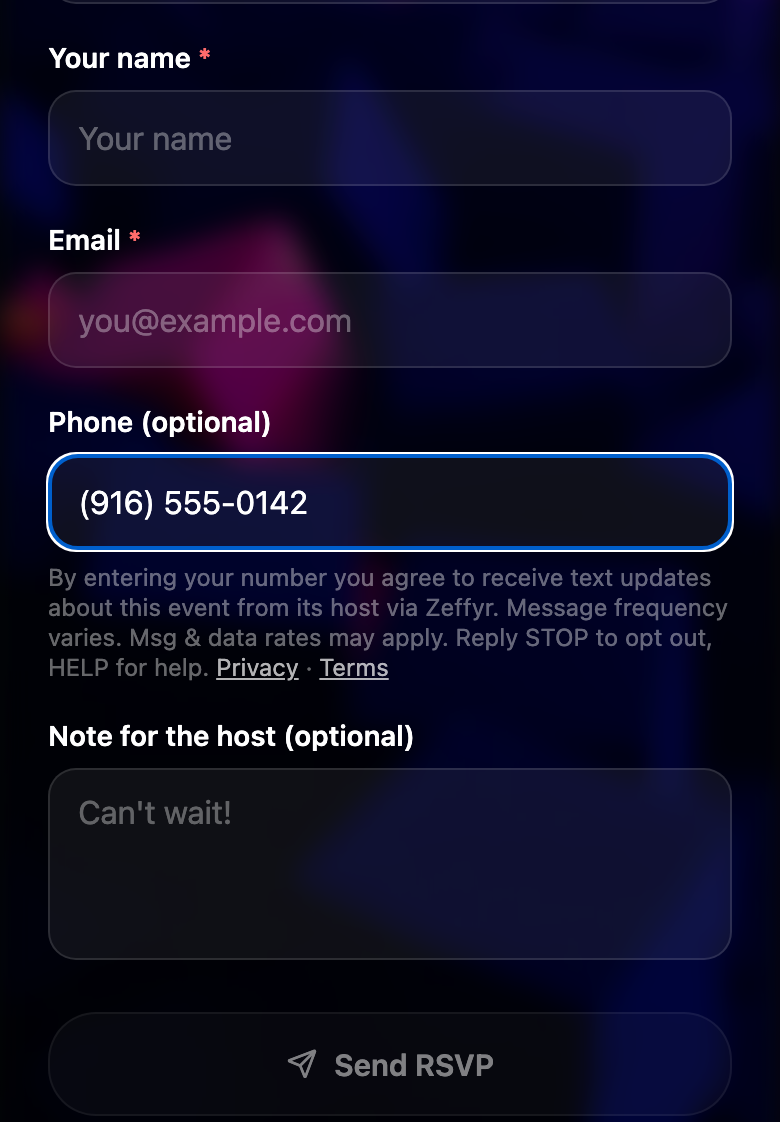
b. Verifying a phone number in the Zeffyr app. Signed-in members can add a phone number to their account by verifying it with a one-time code. Verifying is optional, and the screen that asks for the number shows this consent language beneath the button before any code is sent:
A member who verified a number and RSVPs "going" or "maybe" to an event receives that event's host updates by text. Removing the number from the account in Settings, or replying STOP, ends them.
3. What we send
Texts are sent only when the host of an event you RSVP'd to posts an update. A typical message looks like:
We also send a one-time verification code by text if you choose to verify your phone number in the Zeffyr app.
4. Frequency and rates
Message frequency varies and depends on host activity; most guests receive a few messages per event. Message and data rates may apply.
5. Opting out and getting help
Reply STOP to any message to stop receiving texts. You will get one confirmation text and nothing further. Reply START to opt back in. Reply HELP for help, or email hello@zeffyr.app.
6. Your phone number and consent data
We do not share, sell, or provide your mobile phone number, SMS opt-in, or messaging consent data to third parties or affiliates for marketing or promotional purposes. Text messaging opt-in data and consent are never shared with third parties. Your number is used only to deliver updates about the specific event you RSVP'd to. Messages are delivered through Twilio, our messaging provider, which processes your number solely to send them.
7. Related policies
See our Privacy Policy and Terms of Service. Questions: hello@zeffyr.app.